> ## Documentation Index
> Fetch the complete documentation index at: https://siderolabs-fe86397c-1-11-reference.mintlify.site/llms.txt
> Use this file to discover all available pages before exploring further.

# Configure Keycloak for Omni

1. Log in to Keycloak.
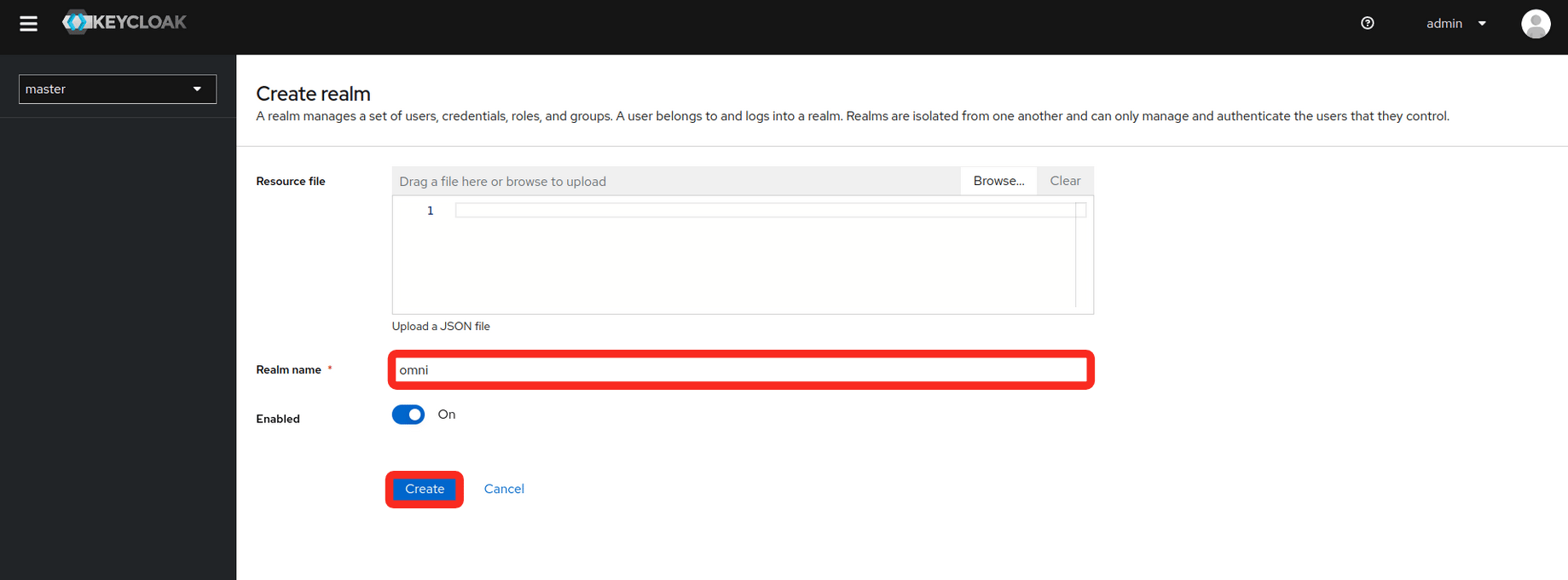
2. Create a realm.

* In the upper left corner of the page, select the dropdown where it says **master**
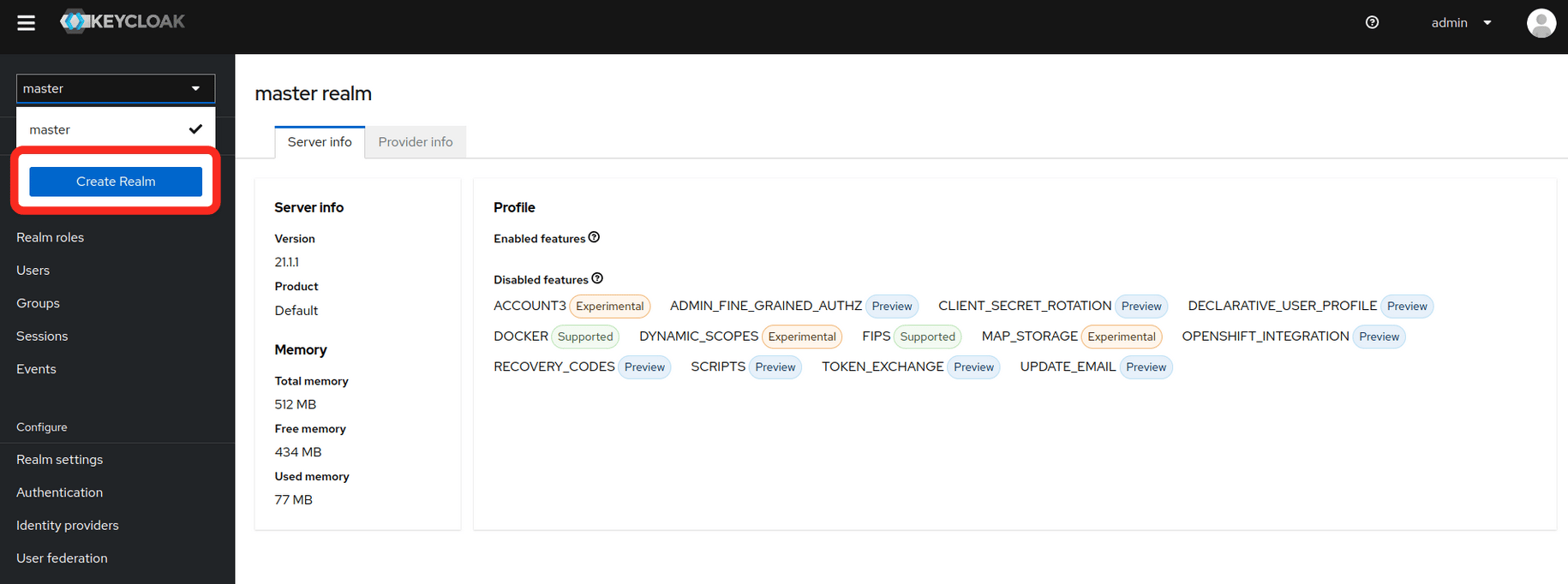
<img src="https://mintcdn.com/siderolabs-fe86397c-1-11-reference/YGuga1UT8xktZXw3/omni/infrastructure-and-extensions/self-hosted/images/configure-keycloak-for-omni-create-realm.png?fit=max&auto=format&n=YGuga1UT8xktZXw3&q=85&s=2cecc50f1a0c8b074ec443caa547ec3a" alt="" width="1830" height="682" data-path="omni/infrastructure-and-extensions/self-hosted/images/configure-keycloak-for-omni-create-realm.png" />

* Fill in the **realm name** and select **create**
<img src="https://mintcdn.com/siderolabs-fe86397c-1-11-reference/YGuga1UT8xktZXw3/omni/infrastructure-and-extensions/self-hosted/images/configure-keycloak-for-omni-omni-create.png?fit=max&auto=format&n=YGuga1UT8xktZXw3&q=85&s=8d1146a2bd48c092569443692ad9e601" alt="" width="1839" height="680" data-path="omni/infrastructure-and-extensions/self-hosted/images/configure-keycloak-for-omni-omni-create.png" />

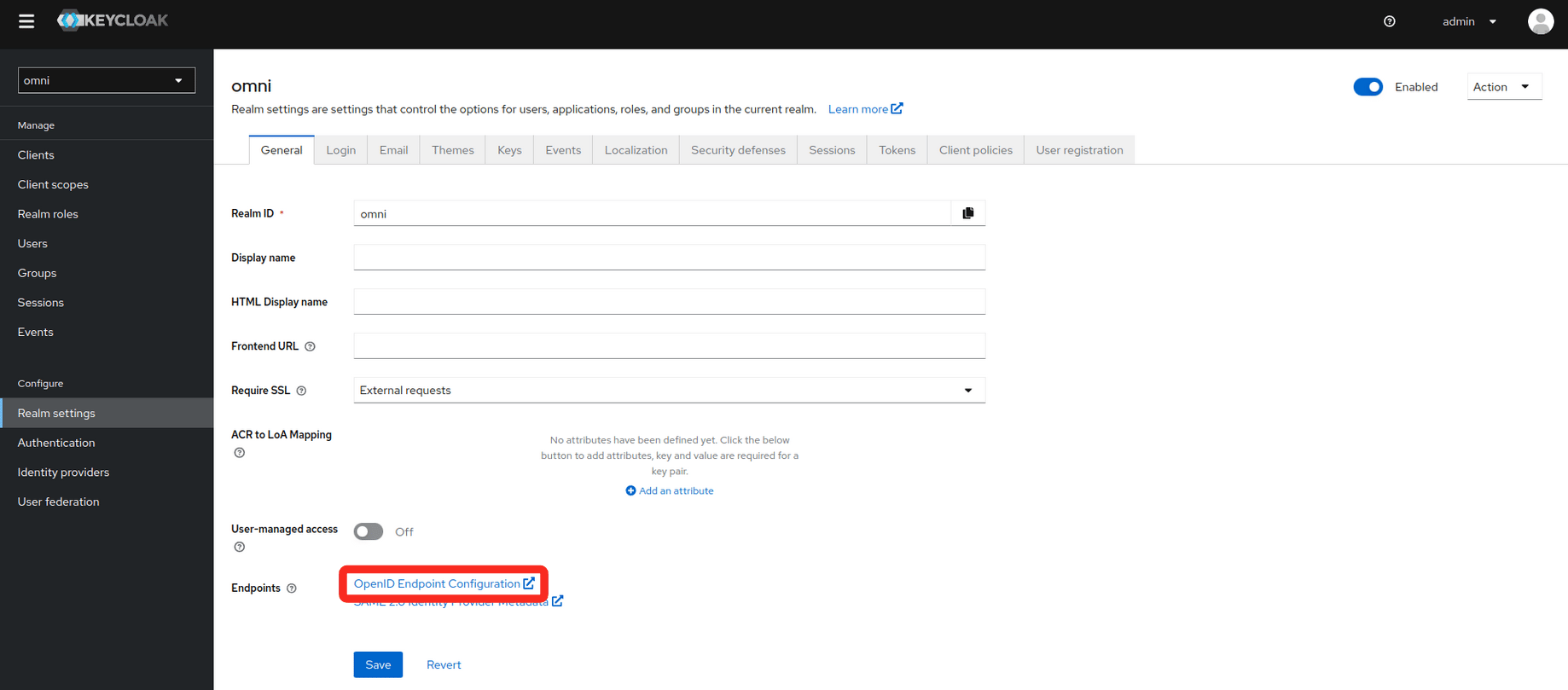
3. Find the realm metadata.

* In the realm settings, there is a link to the metadata needed for SAML under Endpoints.
  * Copy the link or save the data to a file. It will be needed for the installation of Omni.
<img src="https://mintcdn.com/siderolabs-fe86397c-1-11-reference/YGuga1UT8xktZXw3/omni/infrastructure-and-extensions/self-hosted/images/configure-keycloak-for-omni-openID.png?fit=max&auto=format&n=YGuga1UT8xktZXw3&q=85&s=4623ff8729728ab363975452e39e6c83" alt="" width="1838" height="809" data-path="omni/infrastructure-and-extensions/self-hosted/images/configure-keycloak-for-omni-openID.png" />

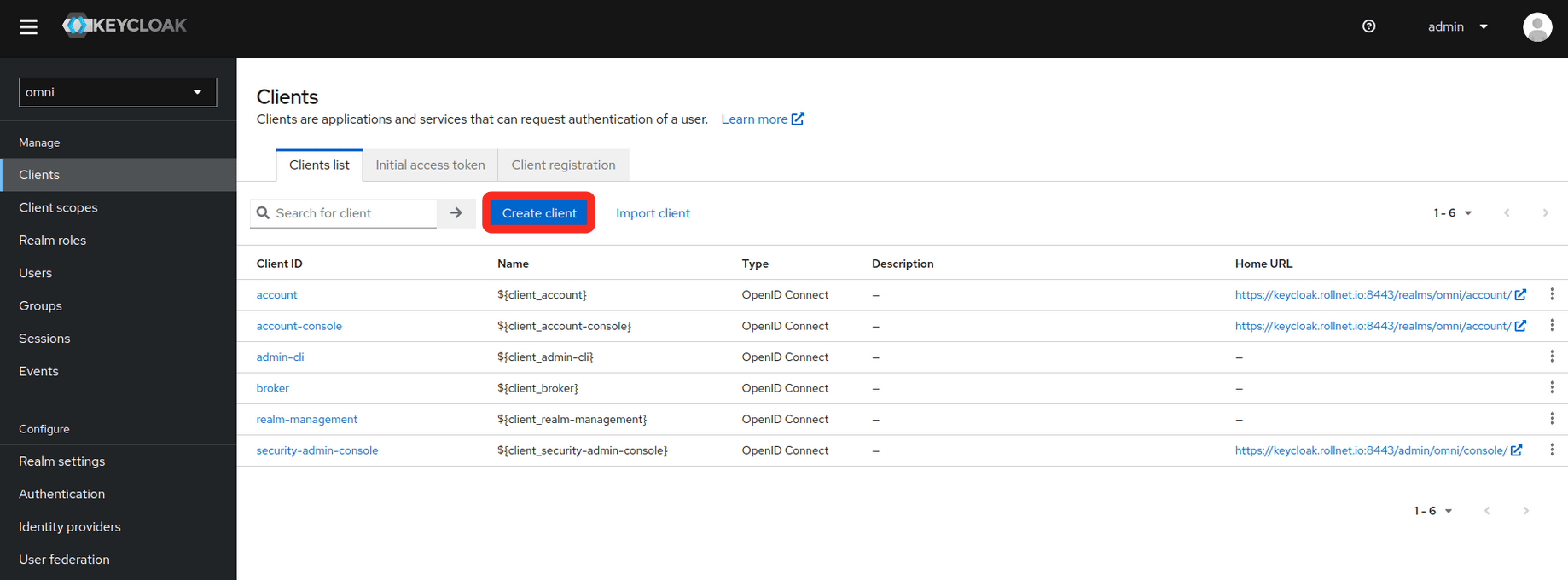
4. Create a client

* Select the **Clients** tab on the left
<img src="https://mintcdn.com/siderolabs-fe86397c-1-11-reference/YGuga1UT8xktZXw3/omni/infrastructure-and-extensions/self-hosted/images/configure-keycloak-for-omni-create-client.png?fit=max&auto=format&n=YGuga1UT8xktZXw3&q=85&s=cf34fb112530560616b8286437a6782b" alt="" width="1838" height="680" data-path="omni/infrastructure-and-extensions/self-hosted/images/configure-keycloak-for-omni-create-client.png" />

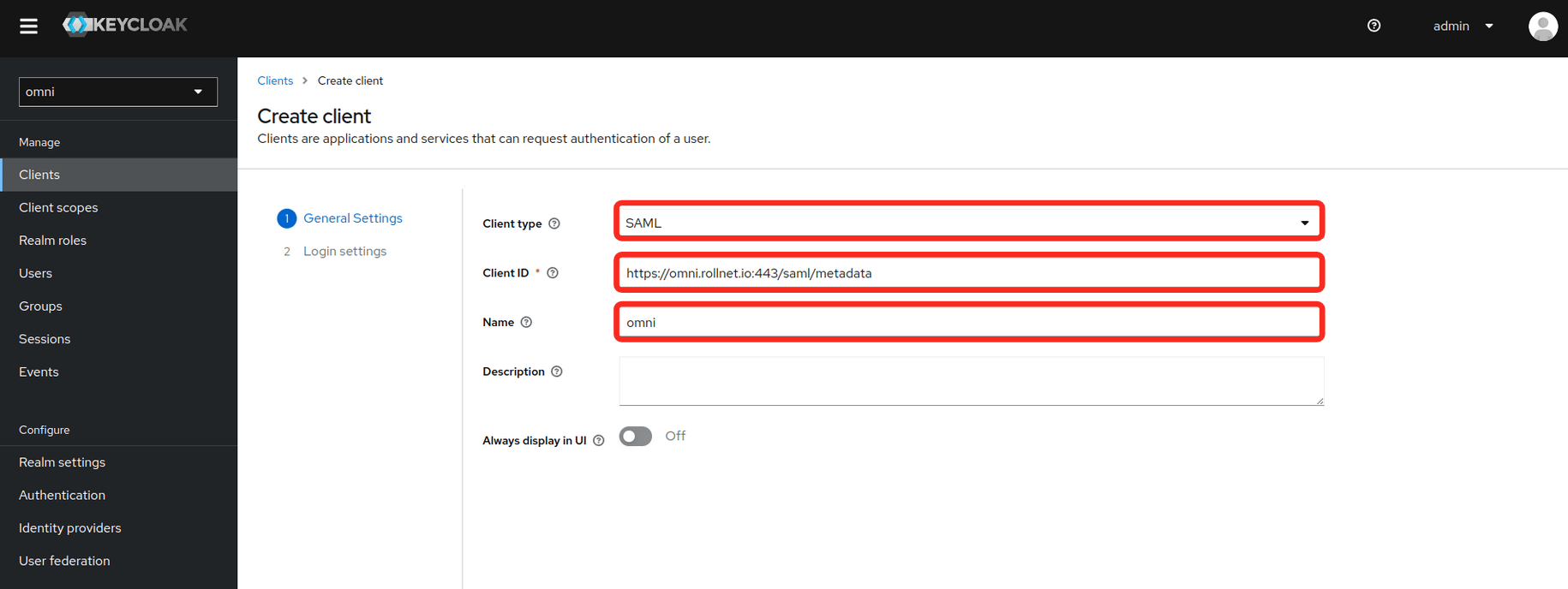
* Fill in the **General Settings** as shown in the example below. **Replace the hostname in the example with your own Omni hostname or IP**.
  * Client type
  * Client ID
  * Name
<img src="https://mintcdn.com/siderolabs-fe86397c-1-11-reference/YGuga1UT8xktZXw3/omni/infrastructure-and-extensions/self-hosted/images/configure-keycloak-for-omni-SAML.png?fit=max&auto=format&n=YGuga1UT8xktZXw3&q=85&s=4248268835be43d9ff9462cadd6022ce" alt="" width="1830" height="688" data-path="omni/infrastructure-and-extensions/self-hosted/images/configure-keycloak-for-omni-SAML.png" />

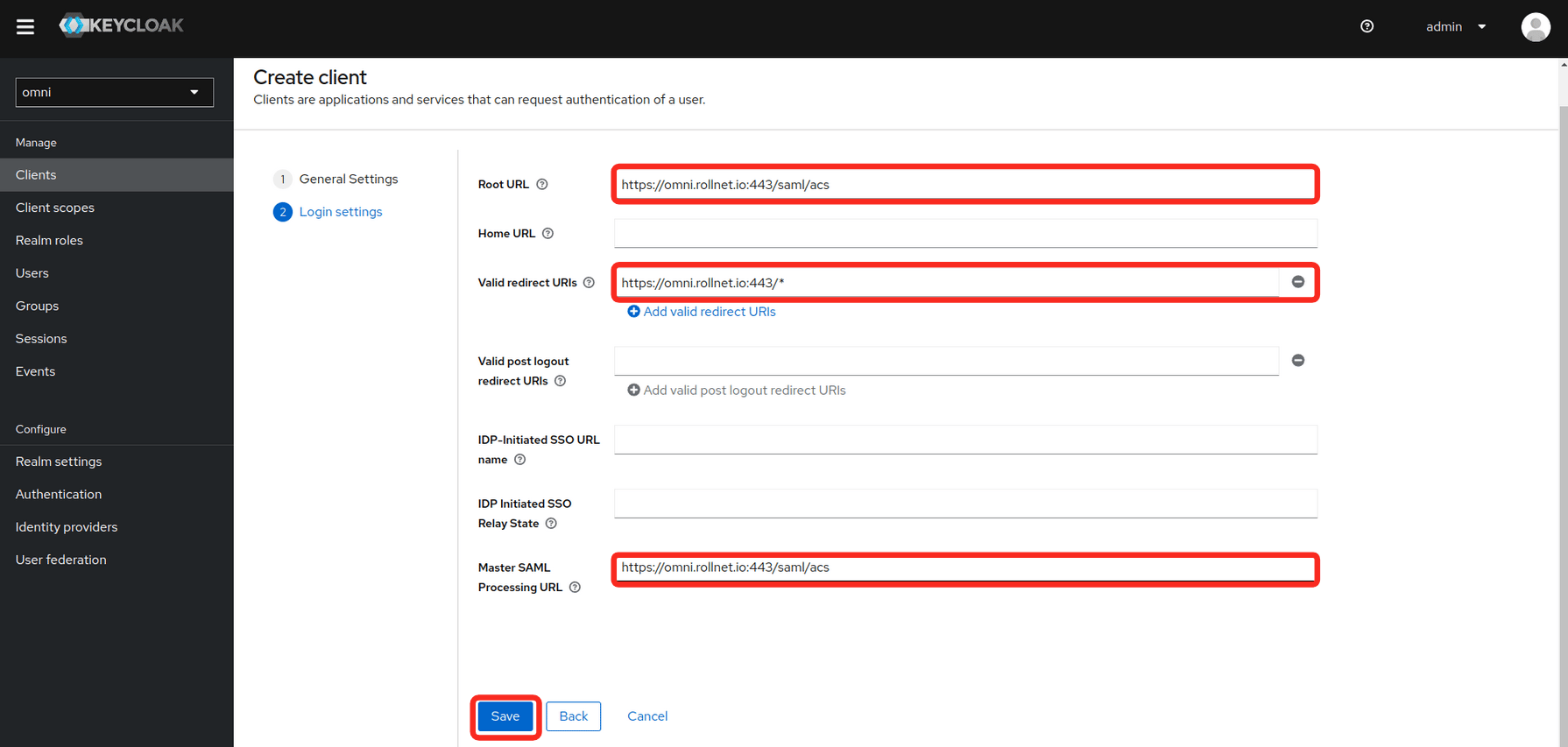
* Fill in the **Login settings** as shown in the example below. **Replace the hostname in the example with your own Omni hostname or IP**.
  * Root URL
  * Valid redirect URIs
  * Master SAML Processing URL
<img src="https://mintcdn.com/siderolabs-fe86397c-1-11-reference/YGuga1UT8xktZXw3/omni/infrastructure-and-extensions/self-hosted/images/configure-keycloak-for-omni-Root-URL.png?fit=max&auto=format&n=YGuga1UT8xktZXw3&q=85&s=5e8263b454be7bb2ead885cdda3e0a7e" alt="" width="1790" height="853" data-path="omni/infrastructure-and-extensions/self-hosted/images/configure-keycloak-for-omni-Root-URL.png" />

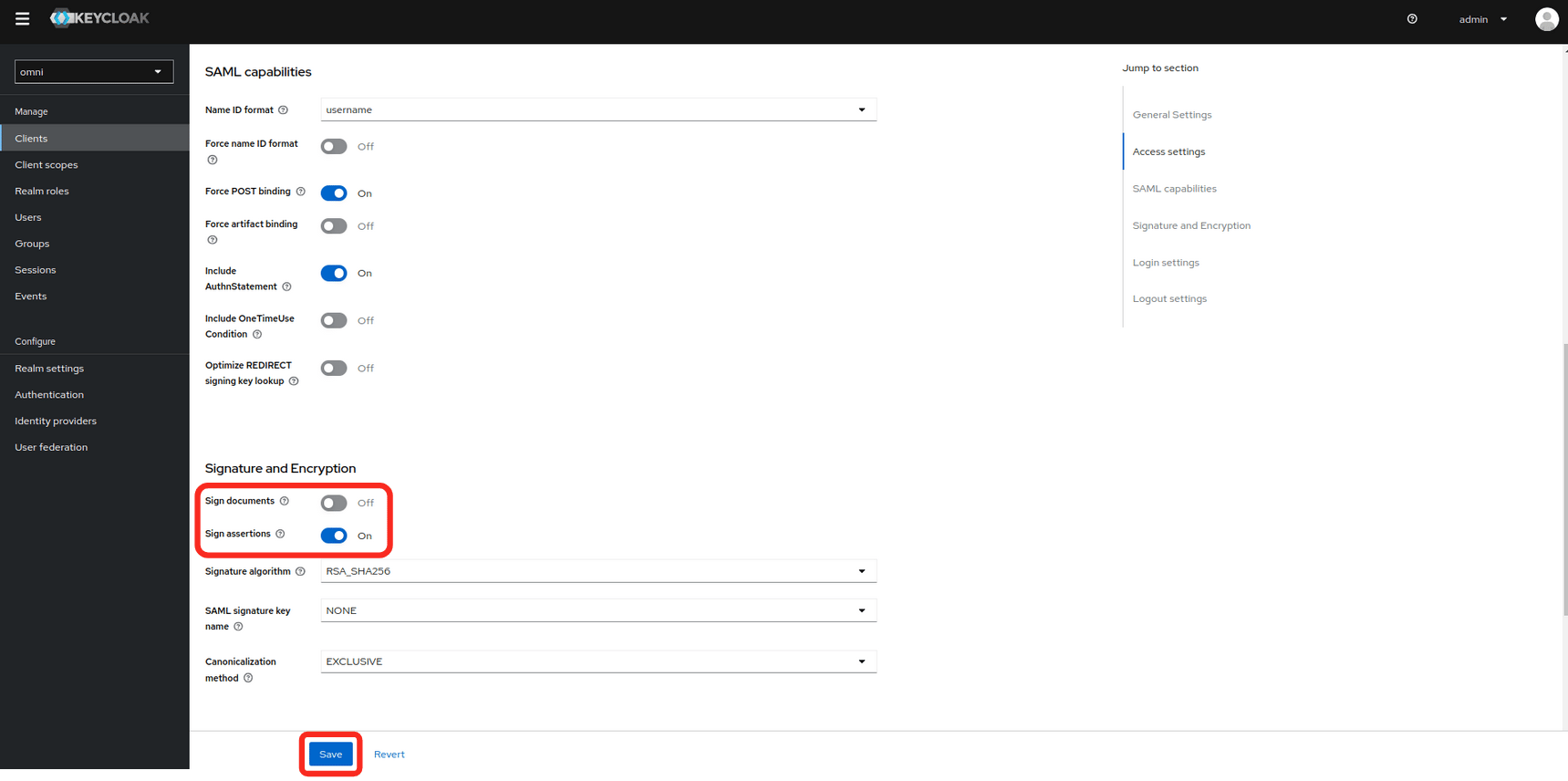
* Modify the **Signature and Encryption** settings.
  * Sign documents: **off**
  * Sign assertions: **on**
<img src="https://mintcdn.com/siderolabs-fe86397c-1-11-reference/YGuga1UT8xktZXw3/omni/infrastructure-and-extensions/self-hosted/images/configure-keycloak-for-omni-signature-encryption.png?fit=max&auto=format&n=YGuga1UT8xktZXw3&q=85&s=e1350f21a4b435373c58fbc8becff16a" alt="" width="1719" height="856" data-path="omni/infrastructure-and-extensions/self-hosted/images/configure-keycloak-for-omni-signature-encryption.png" />

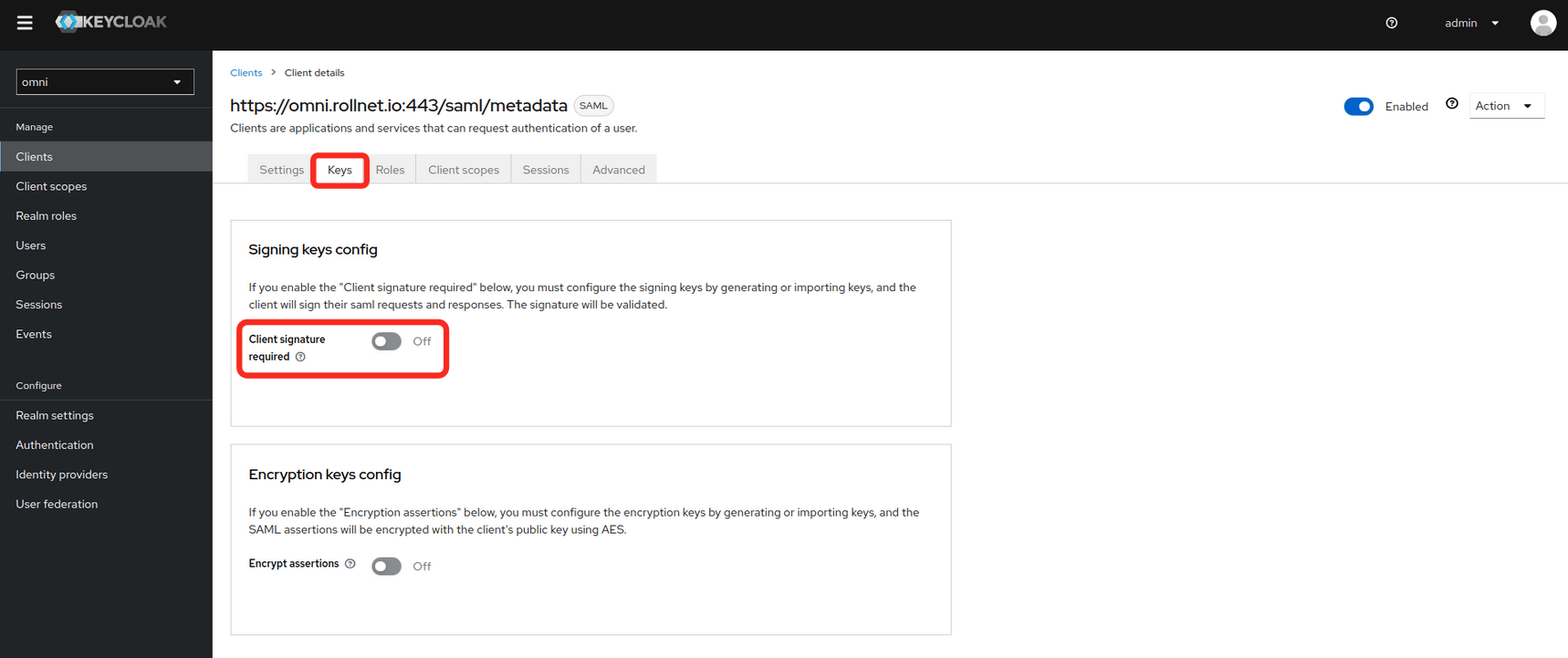
* Set the **Client signature required** value to **off**.
<img src="https://mintcdn.com/siderolabs-fe86397c-1-11-reference/YGuga1UT8xktZXw3/omni/infrastructure-and-extensions/self-hosted/images/configure-keycloak-for-omni-client-signature.png?fit=max&auto=format&n=YGuga1UT8xktZXw3&q=85&s=b08bf086441ca95052b4f34c66ac0d34" alt="" width="1718" height="721" data-path="omni/infrastructure-and-extensions/self-hosted/images/configure-keycloak-for-omni-client-signature.png" />

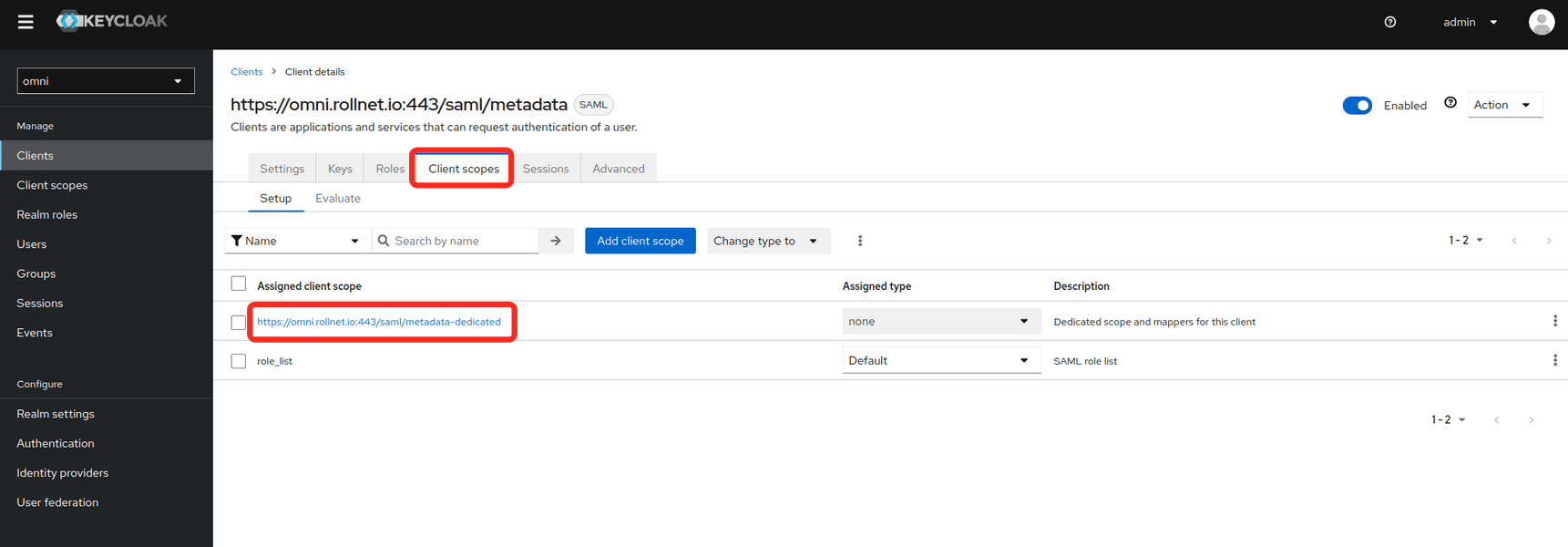
* Modify **Client Scopes**

<img src="https://mintcdn.com/siderolabs-fe86397c-1-11-reference/YGuga1UT8xktZXw3/omni/infrastructure-and-extensions/self-hosted/images/configure-keycloak-for-omni-client-scopes.png?fit=max&auto=format&n=YGuga1UT8xktZXw3&q=85&s=f3b1321dc083d57ba8903d1ed27d87a6" alt="" width="1721" height="600" data-path="omni/infrastructure-and-extensions/self-hosted/images/configure-keycloak-for-omni-client-scopes.png" />

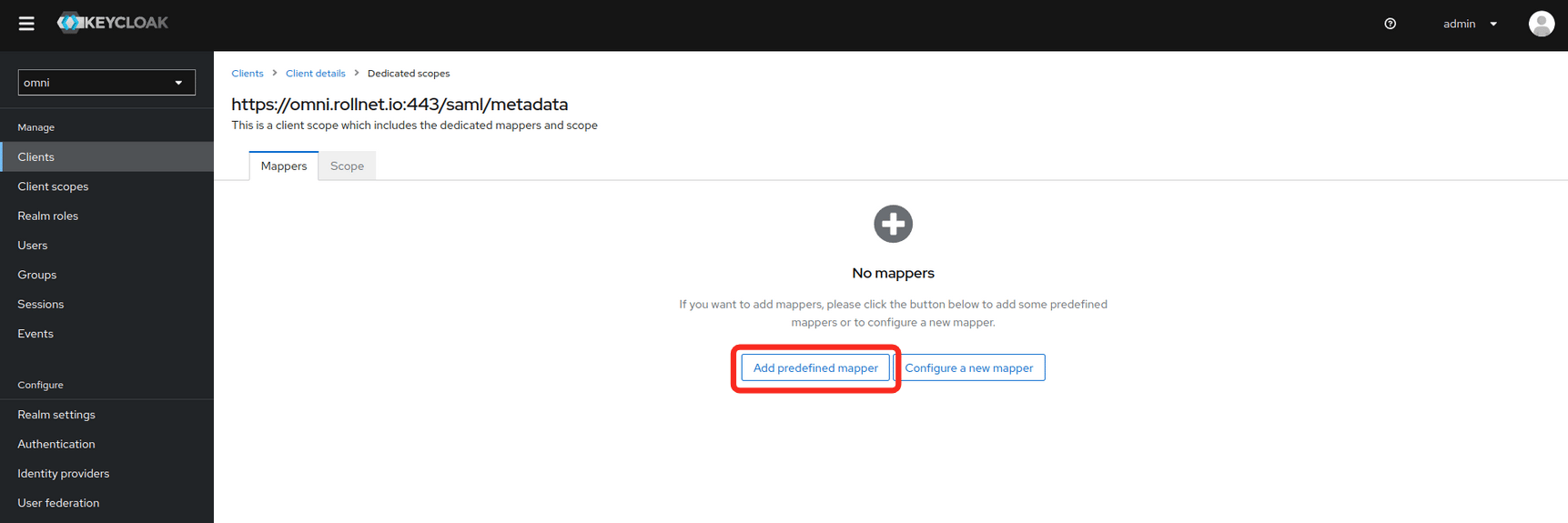
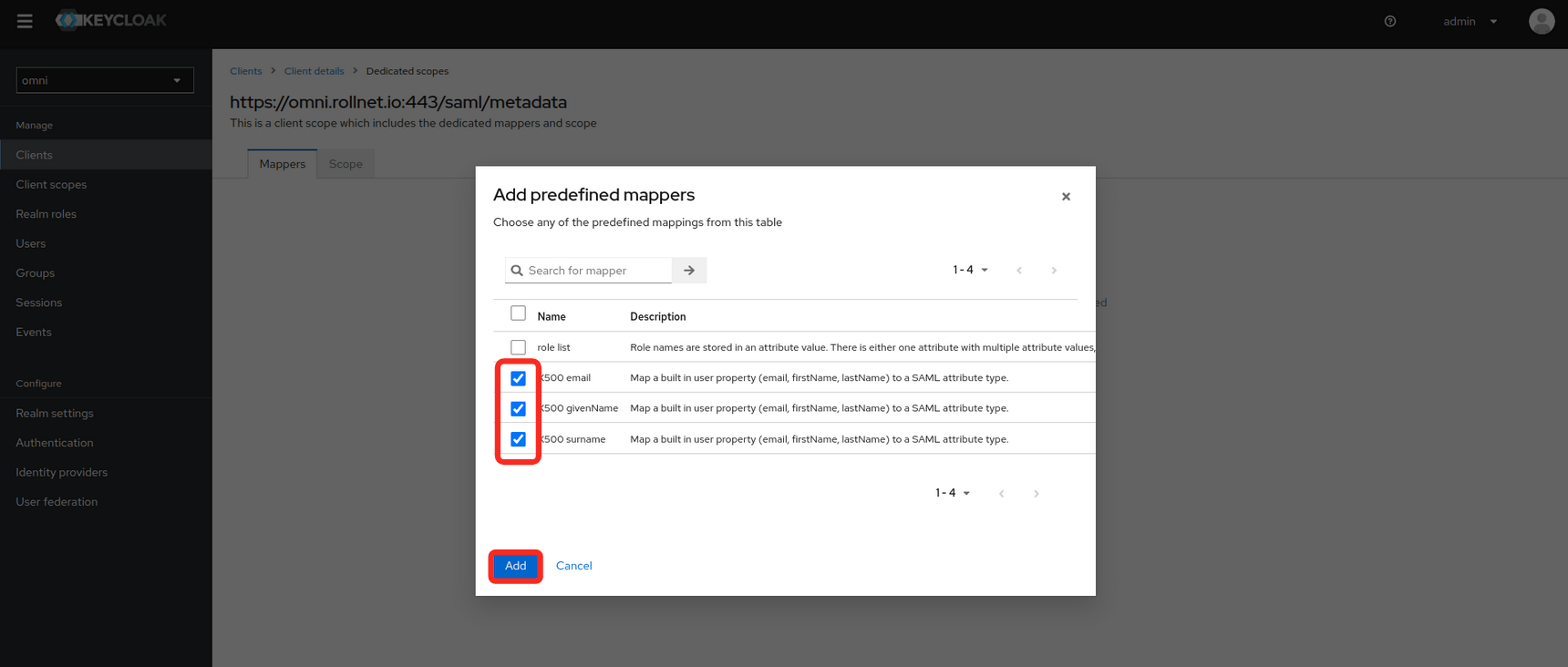
* Select **Add predefined mapper**.

<img src="https://mintcdn.com/siderolabs-fe86397c-1-11-reference/YGuga1UT8xktZXw3/omni/infrastructure-and-extensions/self-hosted/images/configure-keycloak-for-omni-predefined-mapper.png?fit=max&auto=format&n=YGuga1UT8xktZXw3&q=85&s=baf7be9164235ae9068bf70e782fc60b" alt="" width="1723" height="575" data-path="omni/infrastructure-and-extensions/self-hosted/images/configure-keycloak-for-omni-predefined-mapper.png" />

* The following mappers need to be added because they will be used by Omni will use these attributes for assigning permissions.
  * X500 email
  * X500 givenName
  * X500 surname
<img src="https://mintcdn.com/siderolabs-fe86397c-1-11-reference/YGuga1UT8xktZXw3/omni/infrastructure-and-extensions/self-hosted/images/configure-keycloak-for-omni-add-predefined-mappers.png?fit=max&auto=format&n=YGuga1UT8xktZXw3&q=85&s=2fd1f27ee5abe0d8f5032039b0f4696b" alt="" width="1720" height="732" data-path="omni/infrastructure-and-extensions/self-hosted/images/configure-keycloak-for-omni-add-predefined-mappers.png" />

* Add a new user (optional)
  * If Keycloak is being used as an Identity Provider, users can be created here.

<img src="" alt="./images/configure-keycloak-for-omni-create-new-user.png" />

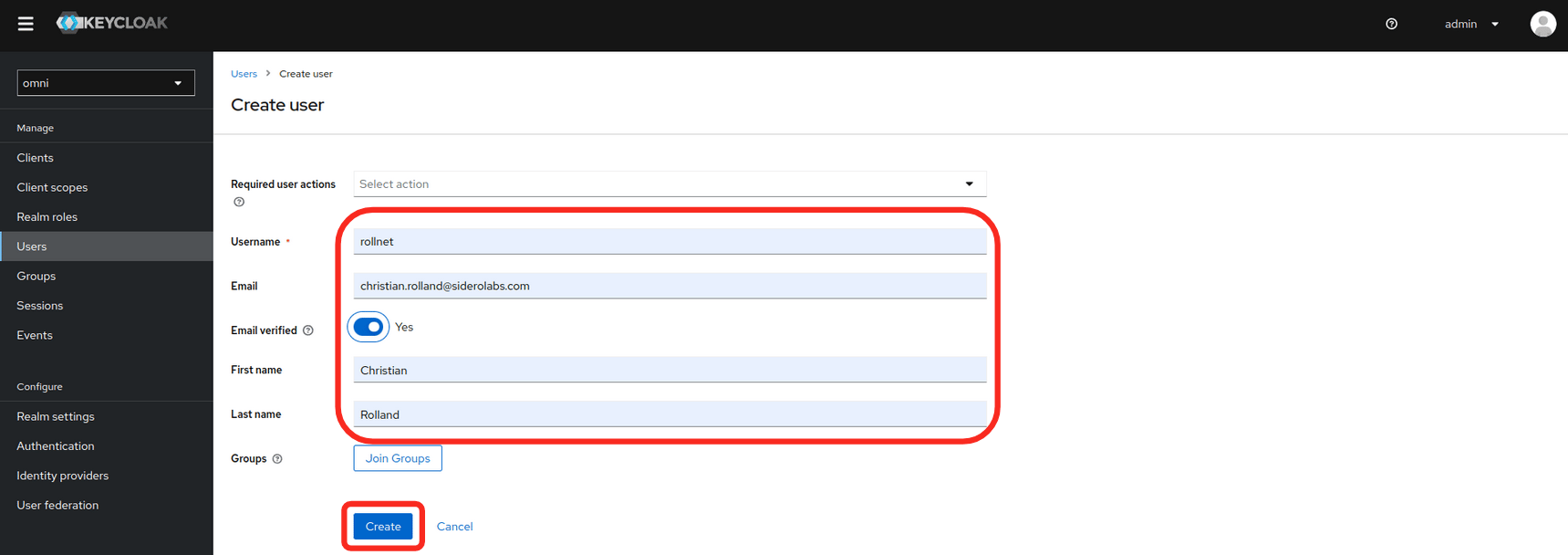
* Enter the **user information** and set the **Email verified** to **Yes**
<img src="https://mintcdn.com/siderolabs-fe86397c-1-11-reference/YGuga1UT8xktZXw3/omni/infrastructure-and-extensions/self-hosted/images/configure-keycloak-for-omni-create-new-user-form.png?fit=max&auto=format&n=YGuga1UT8xktZXw3&q=85&s=5c49e4a514cbd893c1dec4483d704982" alt="" width="1719" height="608" data-path="omni/infrastructure-and-extensions/self-hosted/images/configure-keycloak-for-omni-create-new-user-form.png" />

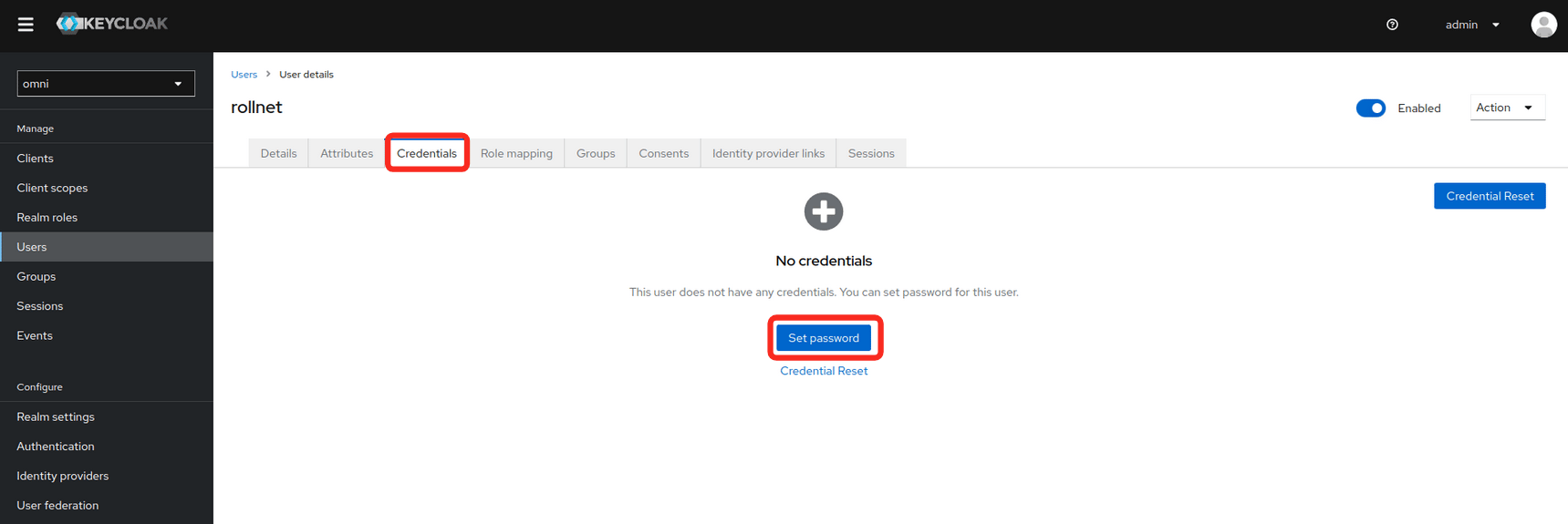
* Set a password for the user.

<img src="https://mintcdn.com/siderolabs-fe86397c-1-11-reference/YGuga1UT8xktZXw3/omni/infrastructure-and-extensions/self-hosted/images/configure-keycloak-for-omni-no-credentials.png?fit=max&auto=format&n=YGuga1UT8xktZXw3&q=85&s=f840409deecf1b43717557e448ba756d" alt="" width="1719" height="575" data-path="omni/infrastructure-and-extensions/self-hosted/images/configure-keycloak-for-omni-no-credentials.png" />

***