 Talos
Talos Omni
Omni Kubernetes Guides

Enabling Workload Service Proxying Feature
You first need to enable the workload service proxying feature on the cluster you want to expose Services from. If you are creating a new cluster, you can enable the feature by checking the checkbox in the “Cluster Features” section: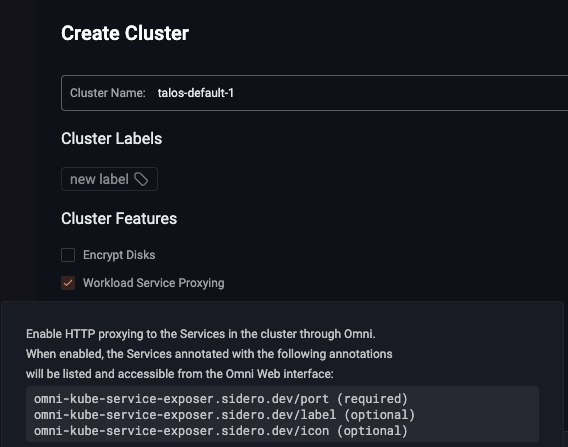
Exposing a Kubernetes Service
Let’s install a simple Nginx deployment and service to expose it. Create the followingnginx.yaml file:
omni-kube-service-exposer.sidero.dev/port annotation is required.
Its value must be a port that is unused on the nodes, such as by other exposed Services.
The annotation omni-kube-service-exposer.sidero.dev/label can be set to a human-friendly name to be displayed on the Omni Web left menu.
If not set, the default name of <service-name>.<service-namespace> will be used.
The annotation omni-kube-service-exposer.sidero.dev/prefix can be set to use a user-defined prefix instead of a randomly-generated alphanumeric string as a prefix in the URL.
The annotation omni-kube-service-exposer.sidero.dev/icon can be set to render an icon for this service on the Omni Web left menu.
If set, valid values are:
- Either a base64-encoded SVG
- Or a base64-encoded GZIP of an SVG
icon.svg to be used for the annotation, you can use the following command:
Accessing the Exposed Service
You will notice that the Service you annotated will appear under the “Exposed Services” section in Omni Web, on the left menu when the cluster is selected. Clicking it will open the exposed service in Omni.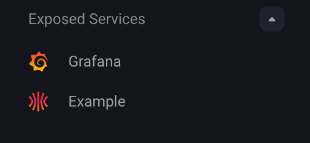
omni-kube-service-exposer.sidero.dev/prefix annotation was set.
This feature only works with HTTP services. Raw TCP or UDP are not supported.
Readerlevel access to the cluster containing the Service.
Examples
Some common examples include running cluster services such as monitoring that require Omni access.Grafana
Grafana is a popular dashboarding tool that can be installed as a helm chart and exposed with the followingvalues.yaml.
Kubernetes Dashboard
The Kubernetes dashboard can be deployed via helm into a cluster and exposed with the workload proxy using the followingvalues.yaml.